RedSn0w 0.9.6 b1 for Mac OS X was released a while ago. Today DevTeam created a version for Windows users. RedSn0w 0.9.6 b1 can jailbreak iOS 4.1 and iOS 4.1 running on iPhone 3G or iPod touch 2G.
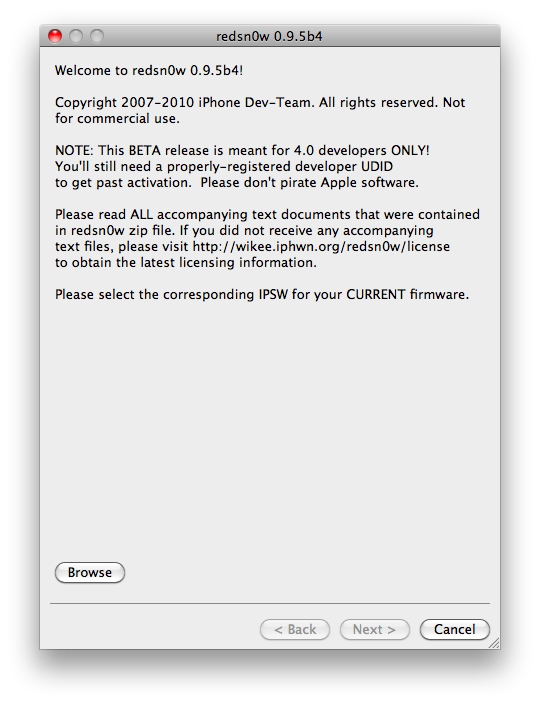
Select your stock 4.1 or 4.0 ipsw (you’ve already used this to update your device to 4.1 or 4.0)
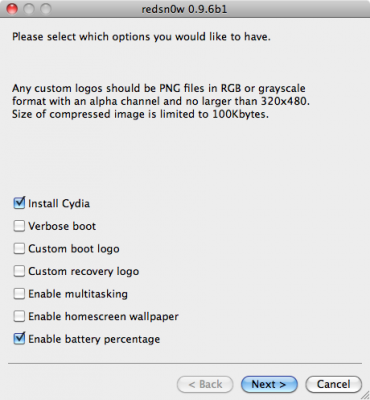
Select “Install Cydia” and any of the other options shown above, then click “Next”. Use DFU mode to install the jailbreak.
This is still beta, so there might be some problems:
Any Windows users seeing “Waiting for reboot” for too long (more than 20 seconds or so), please try “shaking” the JB process by unplugging then replugging your USB cable (while letting redsn0w continue to run). Also, try using a USB port “closer” to your computer (as opposed to on your monitor or behind another hub).
As usual DevTeam reminds us:
IF YOU USE THE ULTRASN0W UNLOCK, PLEASE WAIT FOR PWNAGETOOL TO SUPPORT 4.1. DO NOT USE REDSN0W
That’s because to use redsn0w at 4.1, you need to already have updated to official 4.1 from Apple. If you do that, you lose the ultrasn0w unlock (possibly forever).
DevTeam recently released new version of redsn0w to jailbreak iOS 4.1. New RedSn0w 0.9.6 b1 supports iOS 4.0 and iOS 4.1 running on iPhone 3G or iPod touch 2G.
There is only Mac OS X x86 version, that you can download here.
Select your stock 4.1 or 4.0 ipsw (you’ve already used this to update your device to 4.1 or 4.0)
Select “Install Cydia” and any of the other options shown above, then click “Next”. Use DFU mode to install the jailbreak.
As usual DevTeam reminds us:
IF YOU USE THE ULTRASN0W UNLOCK, PLEASE WAIT FOR PWNAGETOOL TO SUPPORT 4.1. DO NOT USE REDSN0W
That’s because to use redsn0w at 4.1, you need to already have updated to official 4.1 from Apple. If you do that, you lose the ultrasn0w unlock (possibly forever).
Go to /private/var/root/Library/, delete original lockdown folder and put this folder after you extract it from the zip file
Restart phone
If you are not jailbroken:
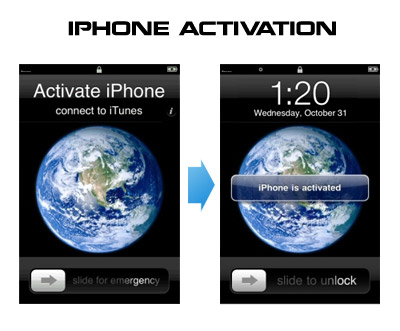
Sherif Hashim discovered that you can activate your iPhone 4, iPhone 3GS or even iPhone 3G without the original carrier SIM card. You need a “phonebook sim card” or 02 simcard. You can buy these type of sim at radioshack, bestbuy or other mobile electronics store (for example ).
Once you get passed the Emergency Call screen, connect to Wifi, jailbreak using and unlock using ultrasn0w. Once that is complete you should be passed activation and unlocked (able to use any sim). If you get a different simcard error, do the following final step:
Download ifunbox software ()
Run ifunbox software and sync with phone
Go to /private/var/root/Library/, delete original lockdown folder and put this folder after you extract it from the zip file
Restart phone
If you have itunes invalid response problem:
Connect to wifi and ssh to your phone (via winscp, putty, terminal, etc).
Navigate to your lockdown folder (/private/var/root/Library/).
Delete pair_records folder
Reconnect the cable and see that your invalid response problem is gone.
If you bought your iPhone 4 on ebay you will need the official sim (at&t) or a universal sim, like ones you can grab at bestbuy for $10 this will get you passed Emergency Screen.
MuscleNerd tweeted today that the recent redsn0w utility is able to jailbreak the iOS 4.1 beta2 on iPhone 3G and iPod Touch 2G. This is useful for developers only, however good news for everyone.
Here’s some info from the DevTeam wiki page:
If you’ve updated to 4.1beta2 on iPhone3G or iPod2G(non-MC), you can use this redsn0w from June to jailbreak. Just point it at the 4.0 IPSW (the public one, not the developer GM one).
(Yes – point it at the 4.0 IPSW even though you’re at 4.1beta2).
Don’t do this if you need the ultrasn0w carrier unlock!!
Note 1: This won’t hacktivate your iPhone3G – but for those with legit access to the 4.1beta2 this shouldn’t matter. Please don’t pirate Apple software
Note 2: If you’re at 4.1beta2 you’ll probably experience network problems after jailbreaking. Until a new version of redsn0w is released, you may need to rely on afc2 access (such as FunBox-like file browser programs) to manipulate your filesystem.
Note 3: This is recommended only for power users who can deal with the problems that will pop up as the JB apps fall further behind the beta firmwares.
For those who can legitimately activate to the iPhone3G 4.0GM seed, the “point to previous IPSW” redsn0w trick works and will jailbreak your 4.0GM. The “trick” is to point redsn0w at the 4.0beta4 IPSW instead of 4.0GM (do this after you’ve updated to 4.0GM and activated through the new iTunes 9.2 on your Mac). Since the carrier unlocks aren’t yet supported at 4.0, don’t do this if you use yellowsn0w/ultrasn0w/blacksn0w. Many JB apps are still pretty buggy in 4.0, so again this is mostly useful only for developers of those JB apps.
Note: If you’re experiencing MobileSafari crashes, double check that you’re running the version at the bottom of this page.
For those without legit iPhone3G 4.0GM seed access, please wait until the full public 4.0 release for updates to the jailbreak tools.