MuscleNerd has announced via Twitter that jailbreak utility RedSn0w 0.9.9b1 is released with major update and numerous new features:
Major improvements and features added to redsn0w 0.9 .9b1! See update #9 at http://is.gd/6eek4Y Feedback: @redsn0w_testers
Indeed the list of new features is quite high. There are two main ones:
There is no need to download firmware any more. There is no need to push Browse IPWS button any more (but you still can).
Developers added lots of functionality to work with SHSH keys (extract, submit, download, verify, stitch etc)
However this new version does not bring features like untethered jailbreak for iOS 4.3.5 or iOS 5.
Due to some possible bugs we still recommend to use the old RedSn0w 0.9.8b7b , but the new 0.9.9b1 is worth seeing and playing with.
Here are links to our RedSn0w 0.9.8b7b iOS 4.3.5 jailbreak tutorials:
You can download RedSn0w 0.9.9b1 here
Here is the full list of features from DevTeam:
Tags: 0.9.9b1 ,
1 ,
3G ,
3GS ,
4.3 ,
4G ,
Ads ,
app ,
Apple ,
baseband ,
beta ,
bug ,
Cydia ,
developers ,
DevTeam ,
download ,
ECID ,
EDGE ,
error ,
Firmware ,
fun ,
Google ,
Howto ,
iOS ,
iOS 4 ,
iOS 4.3 ,
iOS 4.3.5 ,
iOS 5 ,
iOS4 ,
iPad ,
iPhone ,
iPhone 3G ,
iPhone 3GS ,
iPhone 4 ,
iPod ,
iPod Touch ,
iPod Touch 3 ,
iPod Touch 3G ,
IPS ,
ipsw ,
iTunes ,
jailbreak ,
Mac ,
MuscleNerd ,
new version ,
plist ,
push ,
redsn0w ,
redsn0w 0.9 ,
RedSn0w 0.9.8 ,
RedSn0w 0.9.8b7 ,
RedSn0w 0.9.8b7b ,
RedSn0w 0.9.9 ,
RedSn0w 0.9.9b1 ,
Rejection ,
sed ,
SHSH ,
stock ,
test ,
tethered ,
tethered jailbreak ,
TinyUmbrella ,
tricks ,
Tutorial ,
Twitter ,
untethered ,
untethered jailbreak ,
update ,
Windows ,
zip ,
джейлбрейк ,
джейлбрейк iOS 4 ,
отвязанный джейлбрейк ,
скачать
MuscleNerd recently Tweeted that iOS 5 beta 1 jailbreak is already available. DevTeam released Redsn0w 0.9.8 b1.
For now the jailbreak is tethered (you have to run redsn0w each time you reboot) and available for Mac OS X only. It will not activate your device, so you need have registered UDID. iPhone 3GS users with 06.15 baseband: redsn0w will get you past the iTunes restore error. This redsn0w will probably work on future versions of iOS 5.
Redsn0w 0.9.8 b1 works with iOS 5 b1 on iPhone 4 iPod Touch 3G , iPod Touch 4G , iPad 1.
This is mostely for developers of Cydia apps. Most tweaks and Cydia applications do not work on iOS 5.
You can download Redsn0w 0.9.8 b1 here .
Tags: 1 ,
3G ,
3GS ,
4G ,
Ads ,
app ,
Apple ,
application ,
applications ,
baseband ,
beta ,
CDMA ,
Cydia ,
developers ,
DevTeam ,
download ,
error ,
Google ,
GSM ,
iOS ,
iOS 5 ,
iPad ,
iPhone ,
iPhone 3G ,
iPhone 3GS ,
iPhone 4 ,
iPhone 4G ,
iPod ,
iPod Touch ,
iPod Touch 3 ,
iPod Touch 3G ,
iPod Touch 4 ,
iPod Touch 4G ,
iTunes ,
jailbreak ,
Mac ,
Mac OS X ,
MuscleNerd ,
redsn0w ,
redsn0w 0.9 ,
RedSn0w 0.9.8 ,
sed ,
tethered ,
Time ,
tweak ,
zip ,
айпад ,
айфон ,
айфон 4g ,
айфон 4г ,
джейлбрейк ,
приложения ,
скачать ,
тест
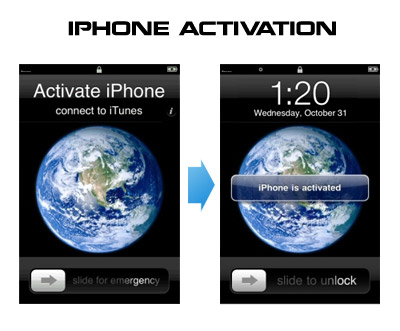
Having problems activating your iPhone? Don’t have original SIM-card? Cannot get passed emergency unlock screen? We have a solution:
If you have iPhone 3G , just use redsn0w to jailbreak and hactivate. If you have iPhone 3GS or iPhone 4
If you are already Jailbroken:
So you have an iPhone with iOS 4.0, but don’t have the original SIM and stuck on the Emergency Call Screen:
Download ifunbox software (download link
Run ifunbox software and sync with phone
Go to /private/var/root/Library/, delete original lockdown folder and put this lockdown
Restart phone
If you are not jailbroken:
Tags: 1 ,
3G ,
3GS ,
4.0 ,
activation ,
Ads ,
AT&T ,
Car ,
Cydia ,
download ,
ebook ,
error ,
fun ,
GSM ,
hack ,
Howto ,
ifunbox ,
iOS ,
iOS 4 ,
iOS 4.0 ,
iOS4 ,
iPhone ,
iPhone 3G ,
iPhone 3GS ,
iPhone 4 ,
iTunes ,
jailbreak ,
JailBreakMe ,
jailbreakme.com ,
less ,
mobile ,
Official ,
redsn0w ,
sed ,
SIM ,
SSH ,
Twitter ,
ultrasn0w ,
Unlock ,
Unlock & Jailbreak ,
USB ,
WiFi ,
zip ,
айфон ,
айфон 4 ,
анлок ,
джейлбрейк
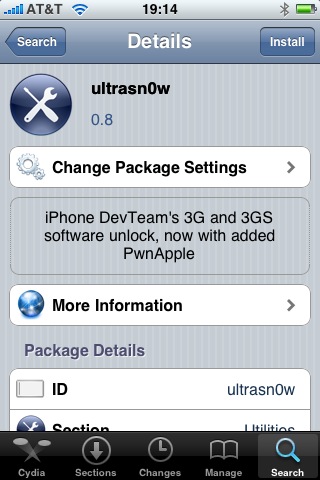
Great news for all iPhone 3GS users. DevTeam updated ultrasn0w software that unlocks iPhone with firmware 3.0. Now it supports iPhone 3GS!
Avaliable in Cydia , repo: repo666.ultrasn0w.com
Here are quick instructions:
Ensure you have firmware 3.0
Jailbreak your iPhone using redsn0w
Run Cydia
Please add the repo repo666.ultrasn0w.com to Cydia. That last “o” is actually the number zero “0”! If you use the letter “o” you’ll get an error.
Search for ‘ultrasn0w’ in cydia or icy and install ultrasn0w
Reboot your iPhone 3G
T-Mobile USA users should disable 3G before using ultrasn0w Enjoy
If you have any problems reset your network settings (it helped many users): Settings->General->Reset->Reset Network Settings
Tags: 3.0 ,
3G ,
3GS ,
Ads ,
Cydia ,
DevTeam ,
error ,
Firmware ,
firmware 3.0 ,
Icy ,
iPhone ,
iPhone 2G ,
iPhone 3G ,
iPhone 3GS ,
iTunes ,
jailbreak ,
mobile ,
news ,
redsn0w ,
T-Mobile ,
ultrasn0w ,
Unlock ,
update ,
USA ,
прошивка ,
прошивка 3.0 ,
разлочка
DevTeam released Ultrasn0w – application that will unlock your iPhone 3G with firmware 3.0. Here are the instructions:
Ensure you have upgraded to iPhone OS 3.0
Jailbreak your iPhone using redsn0w Cydia )
Run Cydia
Please add the repo repo666.ultrasn0w.com to Cydia. That last “o” is actually the number zero “0”! If you use the letter “o” you’ll get an error.
Search for ‘ultrasn0w’ in cydia or icy and install ultrasn0w
Reboot your iPhone 3G
T-Mobile USA users should disable 3G before using ultrasn0w Enjoy
Tags: 1 ,
3.0 ,
3G ,
Ads ,
app ,
application ,
Cydia ,
DevTeam ,
error ,
Firmware ,
firmware 3.0 ,
Icy ,
iPhone ,
iPhone 3G ,
iPhone OS ,
iTunes ,
jailbreak ,
Mac ,
mobile ,
pwnagetool ,
redsn0w ,
sed ,
T-Mobile ,
test ,
ultrasn0w ,
Unlock ,
USA ,
разлочка